Thursday, December 1, 2011

Declare Or Define Variables In PHP

We can store values like characters,strings,integer,float values everything in a variable.In other languages we need to specify the variables type like int a or Dim a as integer etc.But in php we can store any value in a variable without specifying its type.It makes php easier than other languages.To declare a php variable we uses a $  symbol at beginning of variable name.
A variable can be defined as
$variable_name=Variables_value
Eg:
$a=1;
$a='a';
$a="a";
$a=111.11;

Sample Code to try .

<?php
$number=10;
$text="my name";
Echo $number;
Echo "<br>"; // for a new line
Echo $text;
?>

result will be
10
My name

Main Rules must obey to define variable names
Variable name shouldn't contain SPACE
$a and $A are different
You may use 0-9 a-z A-Z and _  to declare a variable name

Tuesday, October 18, 2011

How To Download A File From Internet Without Prompting Using Visual Basic VB6


The declaration for URLDownloadToFile is shown below.

'API function for How to save or download webpages and files without Prompting :

Private Declare Function URLDownloadToFile Lib "urlmon" Alias _
"URLDownloadToFileA" (ByVal pCaller As Long, ByVal szURL As String, ByVal _
szFileName As String, ByVal dwReserved As Long, ByVal lpfnCB As Long) As Long


The function can be called as

returnValue = URLDownloadToFile(0, "http://www.google.com/", _
"c:\google.html", 0, 0)


Sample project , Copy and paste the code given below : Download sample project


Private Declare Function URLDownloadToFile Lib "urlmon" Alias _
"URLDownloadToFileA" (ByVal pCaller As Long, ByVal szURL As String, ByVal _
szFileName As String, ByVal dwReserved As Long, ByVal lpfnCB As Long) As Long

Private Sub Command1_Click()

returnValue = URLDownloadToFile(0, "http://www.google.com/", _
"c:\google.html", 0, 0)

End Sub


Tags : How to download files in vb without prompting,save download files from internet using vb ,copy files from internet using vb without user's knowledge , how to pause and resume downloading files using vb ,save webpages using vb without prompting

C++ Program To Add Subtract Multiply Divide Complex Numbers

Aim 
To write a C++ Program to add subtract multiply divide complex numbers using structure .
Program

#include<iostream>
using namespace std;
main()
{
 float a1,a2,d1,d2;
 struct complex
 {
  float a,b;
 };
complex c1,c2;
cout<<"Enter the real and imaginary part of 2 the complex number";
cin>>c1.a>>c1.b>>c2.a>>c2.b;
cout<<"The Entered complex number is  ";
cout<<c1.a<<"+i"<<c1.b<<"\n"<<c2.a<<"+i"<<c2.b;
cout<<"\n The sum is\n";
a1=c1.a+c2.a;
a2=c1.b+c2.b;
cout<<a1<<"+i"<<a2<<"\n";
cout<<"The difference is "<<c1.a-c2.a<<"+"<<c1.b-c2.b<<"i\n";
cout<<"The product is "<<c1.a*c2.a-c1.b*c2.b<<"+"<<c1.a*c2.a+c1.b*c2.b;
cout<<"i\n";
cout<<"The quotient is ";
d1=((c1.a*c2.a)+(c1.b*c2.b))/((c2.a*c2.a)+(c2.b*c2.b));
d2=((c2.b*c1.a)-(c1.b*c2.a))/((c2.a*c2.a)+(c2.b*c2.b));
cout<<d1<<"+"<<d2<<"i";
return 0;
}


Tags: c++ program to solve complex numbers , c++ program to add complex numbers,c++ program to subtract complex numbers , c++ program to divide complex numbers,c++ program to multiply complex numbers ,algorithm , flowchart

C ++ Program To Find Area Of Rectangle Circle Triangle Pyramid Using Choice


Aim 
To write  a c plus plus program to find area of rectangle,circle,triangle and pyramid by using menu and choice.
Program 
#include<iostream>
#include<math.h>
using namespace std;
main()
{
 int area(int,int);
 float area(float,float,float);
 float area(float);
 double area(float,int);
int n;
cout<<"Menu\n";
cout<<"1.Rectangle\n";
cout<<"2.Circle\n";
cout<<"3.Triangle\n";
cout<<"4.Pyramid\n";
cout<<"Enter your choice\n";
cin>>n;
int l,br,p;
float a,b,c,r,d;
float m;
switch(n)
{
case 1: {
cout<<"Enter the length and breadth of a rectangle\n";
cin>>l>>br;
cout<<"The area of regtangle is "<<area(l,br)<<"\n";
break;
       }
case 2: {
cout<<"Enter the radius of a circle\n";
cin>>r;
cout<<"The area of circle is "<<area(r)<<"\n";
break;
}
case 3: {
cout<<"Enter the side of triangle\n";
cin>>a>>b>>c;
cout<<"The area of triangle is\n";
          d=area(a,b,c);
         cout<<d;
break;
}
case 4:{
cout<<"Enter the base and height of a pyramid\n";
cin>>m>>p;
cout<<"The area of a pyramid"<<area(m,p);
break;
}
}
return 0;
}
int area(int l,int br)
{
 return(l*br);
} 
float area(float r)
{
return(3.14*r*r);
}
float area(float a,float b,float c)


{ float s,d;
 s=(a+b+c)/2.0;
d=sqrt(s*(s-a)*(s-b)*(s-c));
 return(d);
}
double area(float m,int p)
{
return((m*m)+(2*m*p));
}


Tags : c++ program to find area of rectangle , c++ program to find area of circle , c++ program to find area of triangle , c++ program to find area of pyramid , c++ program to find area using functions , algorithm to find area of triangle , circle , rectangle ,pyramid 

Thursday, September 29, 2011

Get Started Basic HTML TAGS

Requirements to study HTML
A text editor
A Web browser
Where you can type the code
Open a text editor like notepad and type the code and save the file as somename.html    The .html is very important


<HTML> - Opening Tag of html Page
</HTML> - Closing tag of a html page

Titles of your webpages

 You can set the titles appearing on web browsers using <title> tag .It can be used as 
<title> Type The Title You Want To Appear </title>

Heading Of a Webpage

You can use <h1> , <h2> , <h3> , <h4> , <h5> , <h6> Tags for headings
These are the results and respective codes of Heading tags

This is a H1 heading  Code -  <h1> This is a H1 heading</h1>

This is a H2 heading         code -   <h2> This is a H2 heading</h2>

This is a H3 heading              code    <h3> This is a H3 heading</h3>

This is a H4 heading                code    <h4> This is a H4 heading</h4>

This is a H5 heading                   code     <h5> This is a H5 heading</h5>
This is a H6 heading                                code    <h6> This is a H6 heading</h6>

Links In a Webpage
     <a href="Type The target of the web address  here"> The Text To be Linked Here </a>
The target of your web page may type after href attribute . See this example


Result digipool
Code --  <a href="http://digipool.blogspot.com/">digipool </a>


In the above example http://digipool.blogspot.com/  is the target address and digipool is the text to be linked.


Wednesday, September 28, 2011

PHP Program Syntax

We can use PHP code between HTML codes .The PHP code must begin with <?php and end with ?> . PHP  may insert between HTML tags but you need to specify it . Using this <?php ?>  we can separate  PHP codes from HTML tags. At executing time server will avoid html tags from execution of the program. If you need to print html tags you can use 


Echo " <html Tag here>";


Eg :


<html>
<p><b> This is a html page contain PHP codes </b></>
<img src="somepicture's path"></img>
PHP code begins here


<?php
printf("This is a block of PHP codes");
?>


<b>PHP code ends</b>
</html>


Printf is used to print some charecters in a html page


Create Database in PHP Mysql

It is very easy to create database in xampp.You can create Databases By directly executing the SQL query Or using PHP Myadmin


Using PHP Myadmin 
Goto http://localhost/phpmyadmin/
Type the name of the database and click on create


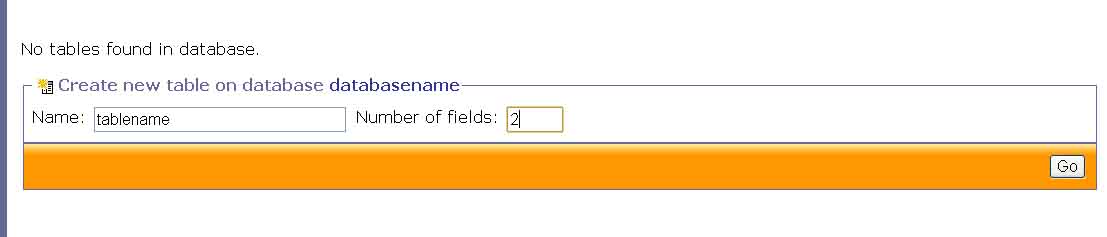
 Type the name of table and Number of fields click on GO
 Type the name of field , type , length and click on GO
Now the database with table and fields is created


You may create database by executing the SQL query directly .


Tags : How to create database in mysql, how to create database tables in php , how to create database in apache server , how to create database  and tables in xampp , create database in PHP  without using query , GUI interface for creating database in xampp , my first php database program